
Is Your Password Safe?
Stop guessing. Learn about entropy, discover why length matters more than complexity, and try the new free tool from Ryse Software designed for clients and IT professionals alike.
Table of Contents
Expand
Most password rules are security theater. Add a capital letter, add a symbol, and somehow you’re “safe.” You’ve probably done what millions do: take a normal word, capitalize the first letter, slap a 1! on the end. It passes the check. It isn’t secure.
We spend our days thinking about digital security so our clients don’t have to. And here’s the uncomfortable part. Computers got faster, hackers got smarter, but the way most people build passwords hasn’t changed in twenty years.
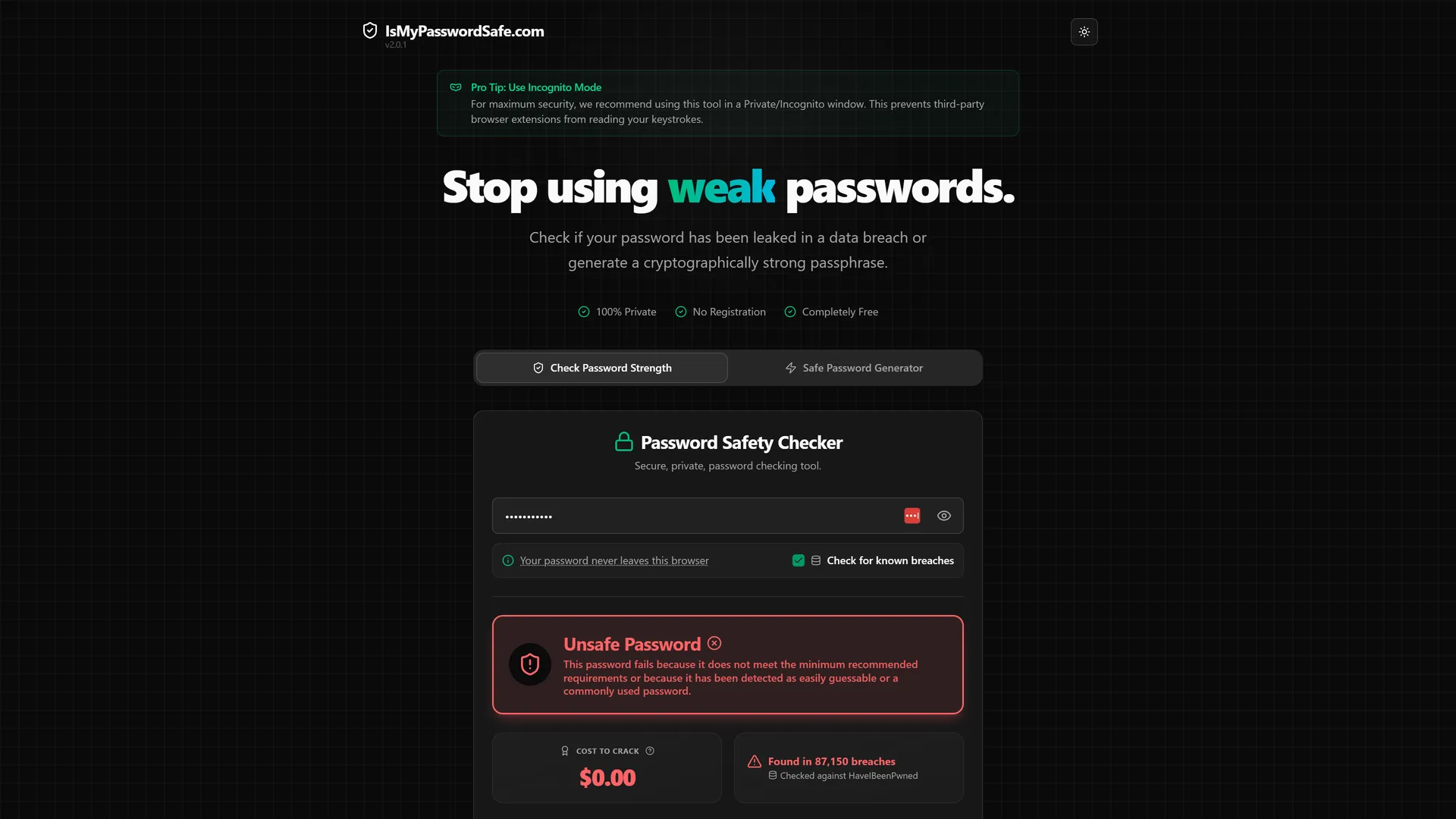
So we built a free tool to help: https://ismypasswordsafe.com.
The Two Ways Passwords Fail
Broadly, a hacker gets in one of two ways.
1. The Brute Force Attack
A program guesses millions of combinations a second. If your password is short, like Ryse2025, a modern graphics card cracks it almost instantly. Not in hours. Instantly.
2. The Data Breach (Credential Stuffing)
Here the hacker doesn’t guess. They look it up. If you used Mustang1968 on a forum that got breached five years ago, it’s sitting in a database on the dark web right now. Reuse it for your email or your bank, and you’ve handed over the keys to the kingdom.
Understanding Entropy: Length Beats Complexity
You were taught that complexity is what keeps you safe. Swap an “E” for a “3,” an “S” for a ”$.” The truth is simpler. Length beats complexity, every time.
In security, entropy is a measure of randomness. Really it’s the mathematical odds of someone guessing your password. Think of it as a lottery. Low entropy is a lottery with 10 balls, easy to call the winner. High entropy is a lottery with 10 million balls. Good luck.
A short password like J4&m! looks complex but has low entropy. A long phrase like correct horse battery staple has no symbols at all, yet its entropy is enormous. A supercomputer would need centuries.
The Solution: The Passphrase
So how do you build something hard for computers but easy for you? A passphrase. Four or five random words strung together.
Tr0ub4dor&3 is a bad password. Hard to remember, easy to crack. purple panda washing machine is a great one. Easy to remember, brutally hard to crack. That’s the whole trick.
Introducing: Is My Password Safe?
We built a single-page tool to do the heavy lifting. Try it now at ismypasswordsafe.com. It does three things.
First, the breach check. We wired in the Have I Been Pwned API, so when you type a password we check whether it’s turned up in known leaks. It gets converted to a cryptographic “hash” first, so your actual password never leaves your browser.
Second, the entropy analyzer. If your password is clean, we run the math and count the “bits” of entropy to tell you whether it’s weak, strong, or overkill.
Third, the diceword generator. Don’t feel like inventing random words? It spits out high-entropy, easy-to-read passphrases you can copy with one click.
The Ultimate Combo: Passphrases and Password Managers
Your brain was not built to remember 50 different sentences about purple pandas. So use a password manager like 1Password or Bitwarden to store random, complex garbage for every account. Then use our tool to generate one incredibly strong master passphrase to unlock the vault. One thing to remember, everything else handled.
Why We Built This
We’re a team of systems architects who happen to believe in a safer internet. Honestly, we built this because we wanted something clean and private to hand our own customers.
Security architecture is a core part of what we do. Through our subscription model, we act as an internal software department for our clients, handling everything from high-velocity development to complex security work, month after month.
Need a team to run your software and security long-term? Let’s talk. In the meantime, go run your current password through it and see how it holds up.
Related Topics
About Ryse Software
We are a software engineering partner that makes it easy for teams to design, build, and evolve custom software, from early experiments to long-term systems.
If this article was useful, and you’re thinking about software in your own business, we’re happy to talk through options and tradeoffs.
A clear discussion, no pressure and no pitch.